Introduction to Data Binding
M.SarulathaAssistant ProfessorDept. of CA.,JJC.
Every ASP.NET web form control inherits the DataBind method from its parent Control class, which gives it an inherent capability to bind data to at least one of its properties. This is known as simple data binding or inline data binding.
Simple data binding involves attaching any collection (item collection) which implements the IEnumerable interface, or the DataSet and DataTable classes to the DataSource property of the control.
On the other hand, some controls can bind records, lists, or columns of data into their structure through a DataSource control. These controls derive from the BaseDataBoundControl class. This is called declarative data binding.
The data source controls help the data-bound controls implement functionalities such as, sorting, paging, and editing data collections.
The BaseDataBoundControl is an abstract class, which is inherited by two more abstract classes:
- DataBoundControl
- HierarchicalDataBoundControl
The abstract class DataBoundControl is again inherited by two more abstract classes:
- ListControl
- CompositeDataBoundControl
The controls capable of simple data binding are derived from the ListControl abstract class and these controls are:
- BulletedList
- CheckBoxList
- DropDownList
- ListBox
- RadioButtonList
The controls capable of declarative data binding (a more complex data binding) are derived from the abstract class CompositeDataBoundControl. These controls are:
- DetailsView
- FormView
- GridView
- RecordList
Simple Data Binding
Simple data binding involves the read-only selection lists. These controls can bind to an array list or fields from a database. Selection lists takes two values from the database or the data source; one value is displayed by the list and the other is considered as the value corresponding to the display.
Let us take up a small example to understand the concept. Create a web site with a bulleted list and a SqlDataSource control on it. Configure the data source control to retrieve two values from your database (we use the same DotNetReferences table as in the previous chapter).
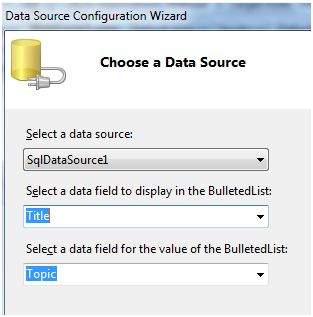
Choosing a data source for the bulleted list control involves:
- Selecting the data source control
- Selecting a field to display, which is called the data field
- Selecting a field for the value
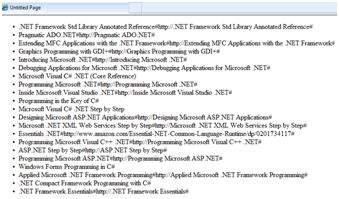
When the application is executed, check that the entire title column is bound to the bulleted list and displayed.
Declarative Data Binding
We have already used declarative data binding in the previous tutorial using GridView control. The other composite data bound controls capable of displaying and manipulating data in a tabular manner are the DetailsView, FormView, and RecordList control.
In the next tutorial, we will look into the technology for handling database, i.e, ADO.NET.
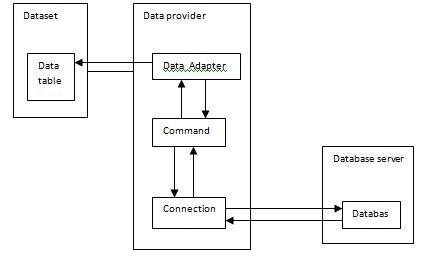
However, the data binding involves the following objects:
A dataset that stores the data retrieved from the database.
The data provider, which retrieves data from the database by using a command over a connection.
The data adapter that issues the select statement stored in the command object; it is also capable of update the data in a database by issuing Insert, Delete, and Update statements.
Relation between the data binding objects:


Comments
Post a Comment